KeyboardKit 10.2
KeyboardKit 10.2 is out! This release introduces a new dictation engine and new settings, as well as bug fixes and improvements.
🎤 Dictation
KeyboardKit 10.2 has a new .keyboard dictation method that makes it possible to perform dictation directly within the keyboard, with an automated app-sync only when needed.
In-keyboard dictation method will only open the main app to start dictation if needed, then navigate back to the keyboard to perform dictation, keeping an open connection to the dictation engine.
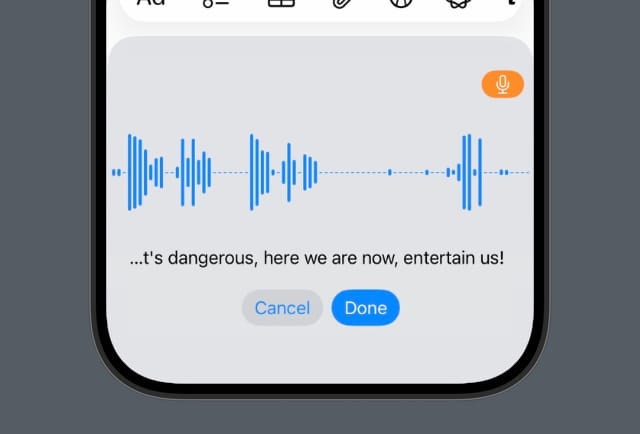
In-keyboard dictation is currently opt-in. Follow the dictation developer guide to set up dictation, then enable keyboard dictation with the dictation settings or the .keyboardDictation experiment.
In-keyboard dictation is the recommended dictation method moving forward. It has new views that provide a great user experience, like Dictation.ProgressView and Dictation.VolumeVisualizer.
The Dictation feature also has new tools like the new Dictation.VolumeRecorder. KeyboardKit Pro unlocks all required tools to easily set up dictation.
The dictation engine supports the following locales, which means you can use it with languages that are not yet supported by the keyboard engine:
Arabic (ar-SA), Cantonese (yue-CN), Catalan (ca-ES), Chinese (zh-CN), Chinese (zh-HK), Chinese (zh-TW), Croatian (hr-HR), Czech (cs-CZ), Danish (da-DK), Dutch (nl-BE), Dutch (nl-NL), English (en-AE), English (en-AU), English (en-CA), English (en-GB), English (en-ID), English (en-IE), English (en-IN), English (en-NZ), English (en-PH), English (en-SA), English (en-SG), English (en-US), English (en-ZA), Finnish (fi-FI), French (fr-BE), French (fr-CA), French (fr-CH), French (fr-FR), German (de-AT), German (de-CH), German (de-DE), Greek (el-GR), Hebrew (he-IL), Hindi (hi-IN), Hindi (hi-IN-translit), Hindi (hi-Latn), Hungarian (hu-HU), Indonesian (id-ID), Italian (it-CH), Italian (it-IT), Japanese (ja-JP), Korean (ko-KR), Malay (ms-MY), Norwegian Bokmål (nb-NO), Polish (pl-PL), Portuguese (pt-BR), Portuguese (pt-PT), Romanian (ro-RO), Russian (ru-RU), Shanghainese (wuu-CN), Slovak (sk-SK), Spanish (es-419), Spanish (es-CL), Spanish (es-CO), Spanish (es-ES), Spanish (es-MX), Spanish (es-US), Swedish (sv-SE), Thai (th-TH), Turkish (tr-TR), Ukrainian (uk-UA), Vietnamese (vi-VN)
⌨️ Keyboard
KeyboardKit 10.2 adds a new .keyboardReplacementOverlay(...) modifier that can be used to easily replace the keyboard view with an equally sized replacement whenever a boolean condition is met.
🧪 Experiments
Experiment has a new .keyboardDictation experiment that affects the .keyboardMethod dictation setting. You can use this to easily toggle keyboard dictation on and off.
Experiments also has a new Experiments.SettingsScreen that can be used to enable experiments. The KeyboardApp.HomeScreen has a link to this screen, that is hidden by default.
🔉 Feedback
The FeedbackContext class has a new isHapticFeedbackAvailable property, which is only true for devices with haptic feedback.
🎛️ Settings
There are many new settings, like isCharacterPreviewEnabled and isPredictiveTextEnabled keyboard settings, and isNextCharacterPredictionEnabled autocomplete setting.
The various settings screens have new toggles and structures, to make them provide more options.
Conclusion
KeyboardKit 10.2 adds many new features and improvements. There are also a bunch of bug fixes and general improvements. For more info, please see the KeyboardKit 10.2 release notes.
Discussions & More
If you found this interesting, please share your thoughts on Bluesky and Mastodon. Make sure to follow to be notified when new content is published.